Receiving Supplier Invoice
A clear and actionable guide to understanding and receiving supplier invoices effectively. This is also where the Cost Information can be viewed and understood.
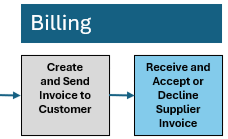
Why Receive Supplier Invoices
Receiving the supplier invoice, often referred to as the cost information document, is a critical part of the P3Source workflow. This step ensures that you can:
- Accurately track costs associated with specific jobs.
- Verify that the supplier's charges align with the agreed-upon terms in the purchase order.
- Streamline your billing and reporting processes.
Timely and accurate receipt of this document ensures smooth downstream processes, including customer billing and financial reconciliation.
How to Receive Supplier Invoices
Step 1:
Automatic Updates via P3Source When a supplier submits their invoice through P3Source:
- The system will automatically log the invoice against the corresponding job.
- You will receive an email notification confirming the submission.
Step 2:
Verifying Invoice Details Once you have access to the invoice, verify the following:
- Cost Information: Ensure the listed costs align with the purchase order and RFQ terms.
- Specifications: Check that the invoice matches the job's scope of work.
- Additional Charges: Confirm any extra charges (e.g., taxes, fees) are justified and previously agreed upon.
Step 3:
Resolving Discrepancies If discrepancies arise:
- Contact the supplier directly to clarify or correct the issue.
- Update the records in P3Source to reflect any adjustments.
Step 4:
Archiving and Linking Ensure that the invoice is archived within P3Source for future reference. Use the job's unique identifier to link all related documents.
Tips for Streamlining
- Use the automated tools within P3Source to reduce manual data entry.
- Regularly audit your invoice records for accuracy and compliance.
- Communicate any changes to cost terms promptly with suppliers.
Receiving and processing supplier invoices efficiently not only keeps your workflow smooth but also establishes trust and accuracy in your financial operations.